Skip to content


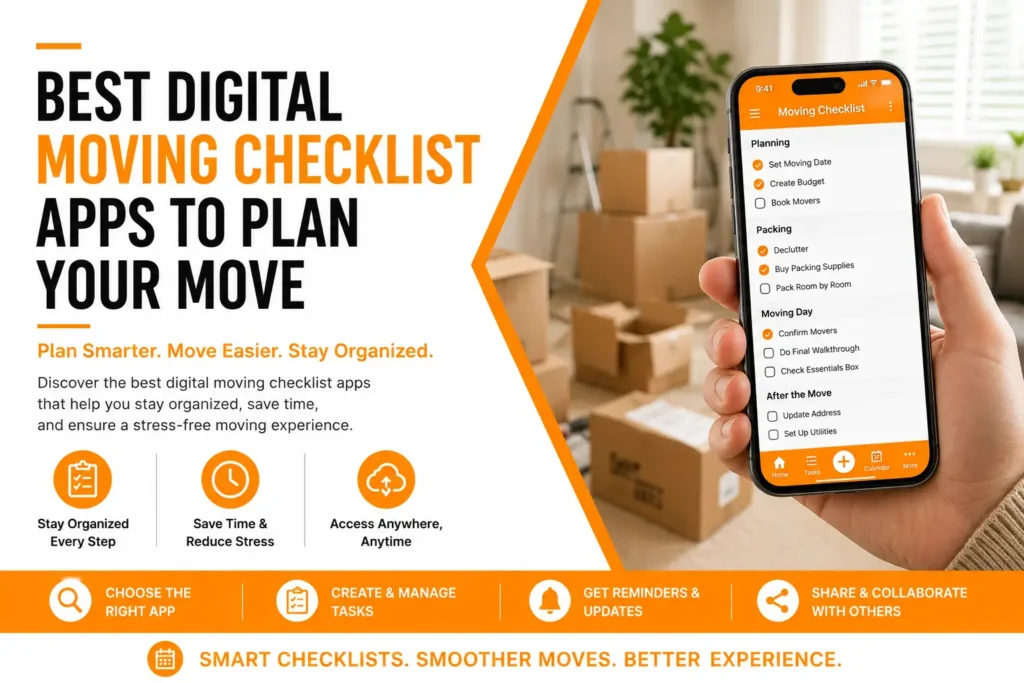
Planning a move involves dozens of deadlines, appointments, packing decisions, and organizational challenges. This is why a digital moving checklist apps comparison has become an essential part of modern relocation planning. Instead of relying on paper notes and spreadsheets, many people now use a moving checklist app to manage every stage of the moving process, from packing a single moving box to coordinating professional movers.
The right app can help you stay organized, build a realistic moving timeline, track expenses, monitor inventory, and prevent costly mistakes. Whether you are relocating within California or preparing a long-distance move, understanding the strengths and limitations of each moving organizer app can make your moving home experience significantly easier. In this guide, we compare the leading moving apps available in 2026 and explain when technology alone is not enough.
Digital Moving Checklist Apps Comparison Table
| App Name | Best For | Inventory Tracking | Checklist Features | Floor Planning | Cost |
| Sortly | Moving inventory app users | Excellent | Good | No | Free & Paid Plans |
| Move Advisor | Complete moving management | Very Good | Excellent | Yes | Free |
| TaskRabbit Moving Planner | Task coordination | Limited | Good | No | Free |
| Home Inventory | Detailed asset tracking | Excellent | Basic | No | Paid |
| Magic Plan | Creating a visual layout | Limited | Basic | Excellent | Free & Paid Plans |
| Google Keep + Calendar | Simple organization | Limited | Good | No | Free |
Why Digital Moving Apps Are Becoming Essential for Modern Relocations
Moving today involves much more than packing belongings and transporting them to a new address. Homeowners and renters must coordinate utility transfers, address changes, scheduling, budgeting, inventory tracking, and vendor communication. A quality moving house app centralizes these responsibilities in one place, helping users manage every stage of their move without losing critical information.
Many digital tools automatically generate a customized moving timeline based on your move date. Instead of wondering what should happen next, users receive reminders for important moving tasks, helping reduce stress and missed deadlines. For families planning complex relocations throughout California, these applications provide a practical framework that keeps projects moving forward efficiently.
For additional relocation planning guidance, readers can review moving checklist resources that explain preparation strategies beyond app-based organization.
Professional moving industry standards published by the American Moving & Storage Association emphasize detailed planning, inventory documentation, and timeline management as critical components of successful relocations. American Moving & Storage Association moving tips.
What Features Matter Most in the Best Moving Checklist App?
The best moving checklist app does more than provide a simple to-do list. Effective platforms include inventory management, budgeting tools, packing schedules, reminder notifications, document storage, and vendor coordination. These features help users manage every phase of the relocation process while reducing the likelihood of overlooked responsibilities.
Another valuable capability is inventory categorization. When every moving box receives a digital label, locating items after arrival becomes much easier. Some applications even support photo documentation, making it simpler to track fragile belongings, electronics, artwork, and furniture before transport.
- Custom moving schedules
- Inventory management
- Expense tracking
- Room-by-room organization
- Document storage
- Reminder notifications
- Vendor coordination
- Real-time progress tracking
Move Advisor: One of the Most Complete Moving Organizer App Solutions
Move Advisor remains one of the most recognized platforms in the relocation industry. It combines inventory tracking, planning tools, scheduling features, and virtual room organization into a single platform. For users seeking a comprehensive moving organizer app, Move Advisor offers an excellent balance between functionality and ease of use.
A particularly useful feature is its built-in floor planning capability. Users can map furniture placement before arriving at their destination, helping movers unload efficiently. This functionality reduces confusion on moving day and allows households to settle into their new homes faster.
Best Use Cases for Move Advisor
Move Advisor works particularly well for families coordinating larger household relocations, long-distance moves, and situations involving multiple service providers. Its combination of inventory tracking and scheduling helps users manage complicated moves involving storage, transportation, and unpacking.
Sortly: A Powerful Moving Inventory App for Detailed Tracking
Sortly is widely regarded as one of the strongest options for users focused on inventory control. As a dedicated moving inventory app, it allows users to create itemized records with photos, categories, QR codes, and location tracking. This can be especially valuable for homeowners transporting expensive belongings.
The ability to document possessions visually supports insurance claims and damage verification if issues arise during transportation. For people handling large households or business relocations, detailed inventory tracking provides an additional layer of security and organization throughout the moving process.
Where Inventory Apps Fall Short
While inventory applications excel at tracking belongings, they often provide limited scheduling functionality. Users may still need separate tools to manage deadlines, contractor appointments, and service coordination, which can create additional complexity during a relocation.
MagicPlan and Visual Planning Tools for Home Layout Design
One of the most overlooked aspects of relocation planning is space management. Applications like Magic Plan focus on creating a visual representation of rooms, allowing users to test furniture placement before arriving at a new property. This feature is especially helpful when downsizing or moving into homes with unfamiliar layouts.
Visual planning also helps determine which items should be sold, donated, or placed in a storage unit. Before spending money transporting unnecessary belongings, homeowners can make informed decisions about furniture placement and space utilization.
Anyone preparing for a California relocation may also benefit from reading downsizing tips before finalizing packing plans.
Free Apps Versus Paid Moving Apps: Which Offers Better Value?
A common question during any digital moving checklist apps comparison california search is whether paid platforms justify their cost. Free solutions typically provide basic checklist management, calendar reminders, and simple note-taking capabilities. For smaller moves, these features may be sufficient.
Paid applications generally introduce advanced inventory management, expense tracking, cloud storage, barcode scanning, and collaboration features. Households managing larger relocations often find these upgrades valuable because they simplify complex logistics and reduce the risk of costly oversights during the move.
- Free apps are ideal for simple local moves
- Paid apps support larger households
- Advanced inventory tools improve accountability
- Collaboration features help families coordinate tasks
- Expense tracking assists budgeting
The U.S. Environmental Protection Agency provides guidance on reducing household waste through reuse and donation before relocation, helping support responsible decluttering and selling unwanted items prior to moving. EPA household waste reduction guidance.
Research from the University of Minnesota highlights how organized household management and inventory planning improve efficiency when handling large-scale transitions and home organization projects.University of Minnesota home organization resource.
How Digital Apps Help You Stay Organized Throughout the Moving Process
The biggest advantage of a modern best moving app is its ability to help users stay organized. Rather than managing multiple notebooks, emails, and spreadsheets, digital platforms consolidate information into a single dashboard. This makes it easier to track appointments, monitor progress, and verify completed tasks.
Organization becomes even more important as moving day approaches. Utility transfers, address updates, school records, insurance changes, and packing schedules often overlap during the final weeks. A structured digital checklist reduces confusion and keeps important responsibilities visible throughout the entire moving process.
- Centralized task management
- Automatic deadline reminders
- Shared family access
- Budget monitoring
- Inventory visibility
- Progress tracking
Using a Moving House App for Decluttering and Selling Unwanted Items
One often overlooked benefit of a moving house app is improved decluttering. Most households discover they own far more items than necessary once they begin inventorying their belongings. Digital tracking makes it easier to identify duplicate items, unused furniture, and possessions that no longer fit future living arrangements.
Reducing clutter before relocation lowers transportation costs, decreases packing time, and minimizes storage requirements. Many apps allow users to categorize items for donation, recycling, or selling unwanted belongings. This creates a more efficient move while reducing the number of boxes and furniture pieces that require transportation.
When Storage Makes Sense
If a new home is not immediately ready for occupancy, placing selected items into a storage unit can simplify logistics. Digital inventories help track stored possessions and reduce the risk of misplaced items during extended transitions.
Readers considering temporary storage can learn more through storage solutions that support flexible moving schedules.
Where DIY Planning Apps Cannot Replace Professional Movers
Technology has improved relocation planning significantly, but even the best moving checklist app has limitations. Apps can remind users to schedule services, label boxes, and update addresses. They cannot physically transport belongings, protect fragile furniture, navigate narrow staircases, or manage complex loading requirements.
Many homeowners underestimate the physical demands of relocation. Large furniture, specialty items, and fragile possessions often require professional equipment and training. Attempting major relocations without adequate support can increase injury risks, property damage, and unexpected delays. This is especially true when heavy lifting, specialty packing, or time-sensitive schedules are involved.
High-Value and Specialty Items Require Extra Protection
Artwork, antiques, pianos, collectibles, and custom furniture require specialized handling. Digital tools can track these possessions, but safe transportation typically depends on experienced movers who understand proper packing, loading, and protection procedures.
Signs Professional Service Is Needed
While many people begin with a free move planning strategy using apps and personal labor, there are situations where professional support becomes the safest and most efficient choice. Recognizing these warning signs early can prevent costly setbacks.
If any of the following situations apply, relying solely on digital planning tools may not be enough:
- Large homes with significant furniture volume
- Multiple flights of stairs
- Long-distance relocations
- High-value or fragile belongings
- Tight move-out deadlines
- Complex apartment building regulations
- Need for temporary storage solutions
- Business or office relocations
- Limited packing time before moving day
- Health or mobility limitations affecting lifting ability
Many households discover that combining a digital planner with professional assistance creates the most reliable outcome. Apps provide structure while experienced movers execute the physical relocation safely and efficiently.
Why Choose Eagle Star Moving
A digital checklist can help organize tasks, but successful execution often requires experienced professionals. From planning and packing to transportation and storage, professional movers help bridge the gap between organization and completion. This is especially important when timelines are tight or household inventories are large.
Eagle Star Moving supports residential and commercial relocations throughout Southern California with services designed to simplify every stage of the move. Whether clients need packing assistance, specialty item transportation, local moving expertise, or long-distance relocation support, professional crews help reduce stress while protecting valuable belongings.
- Experienced local and long-distance moving teams
- Professional packing and unpacking services
- Specialty item transportation
- Furniture protection solutions
- Storage options for flexible scheduling
- Residential and commercial relocation services
- Transparent communication throughout the move
Homeowners seeking a smoother relocation experience can explore home movers, packing services, and free estimate options to determine the level of support that best matches their needs.
Ready to Make Your Move Easier?
The right moving organizer app can improve planning, reduce stress, and help maintain visibility throughout your relocation. However, successful moving involves more than digital organization. Packing, transportation, scheduling, furniture protection, and problem-solving still require practical experience and reliable execution.
If you are comparing apps while preparing for an upcoming move, consider combining technology with professional support. A well-structured moving checklist, an accurate inventory, and experienced movers can help make your transition smoother from start to finish. Contact Eagle Star Moving to discuss your relocation needs, request a quote, or schedule professional moving assistance for your next move.
Frequently Asked Questions
What is the best moving organizer app for planning a relocation?
The best moving organizer app depends on your needs. Apps like MoveAdvisor are excellent for overall planning, while Sortly focuses on inventory tracking. The ideal solution combines scheduling, budgeting, inventory management, and reminders to keep every stage of the move organized.
Which moving house app is best for families?
A quality moving house app should allow multiple users to collaborate on tasks, deadlines, and inventories. Families often benefit from shared checklists and calendar integrations that help everyone stay informed and accountable throughout the relocation process.
Why should I use a moving inventory app?
A moving inventory app helps track belongings, organize boxes, document valuables, and simplify unpacking. It also creates a record of possessions that may be useful for insurance purposes if damage or loss occurs during transportation.
Can a moving checklist app replace professional movers?
No. A moving checklist app helps organize tasks and deadlines, but it cannot perform packing, loading, transportation, or heavy lifting. Professional movers remain essential for safely handling large furniture, specialty items, and complex relocations.
What features should the best moving app include?
The best moving app should include task management, inventory tracking, budget monitoring, calendar reminders, document storage, and collaboration tools. These features help reduce missed deadlines and improve overall organization.
Is a free moving checklist app enough for most moves?
A free app may be sufficient for smaller local relocations. Larger moves often benefit from premium features such as detailed inventories, barcode tracking, budgeting tools, and family collaboration features that simplify more complex moving situations.
What is considered the best moving checklist app for long-distance moves?
The best moving checklist app for long-distance relocations typically includes timeline automation, inventory tracking, expense management, and document storage. These features help manage the additional logistics associated with interstate or cross-country moves.
Conclusion
A thorough digital moving checklist apps comparison shows that today’s planning tools can significantly improve organization, scheduling, inventory tracking, and communication throughout a move. Whether you choose a simple checklist platform or a feature-rich inventory management solution, digital tools can help reduce confusion and keep your relocation on track.
At the same time, apps have limitations. They cannot replace professional packing, transportation expertise, furniture protection, or the physical work required on moving day. Combining a reliable digital planning system with experienced moving professionals often delivers the most efficient and stress-free outcome. If you are preparing for an upcoming relocation, contact Eagle Star Moving to discuss your needs, request guidance, or schedule professional moving services that help make your move easier from start to finish.